
Review and approve Timesheets
Review submitted Staff time and lock approved Timesheets.
Updated 11 September 2026
Open TimesheetsBefore you start: You need permission to approve Timesheets. Without it, the Review tab is hidden.
Review submitted time
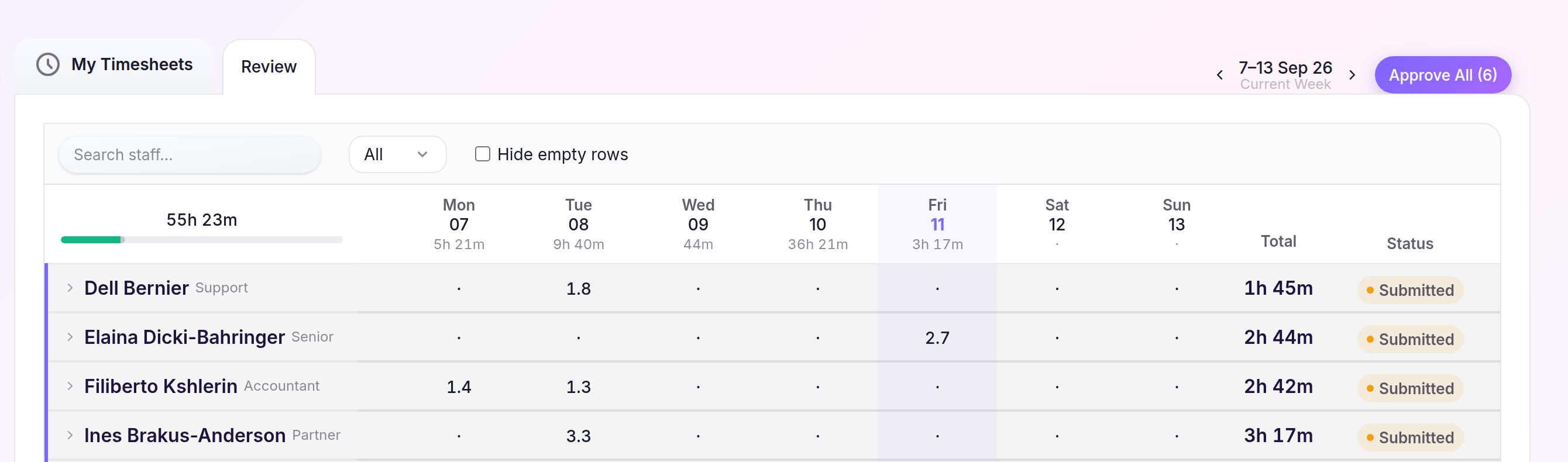
- Select Timesheets in the sidebar, then open Review.
- Choose the week and expand a Staff member to inspect their Engagements, Billing Codes and daily entries.
- Use Search staff… or the Status filter to narrow the list.
Approve the week
- Select a Staff member’s Submitted status to approve their entries.
- To approve every submitted Staff member for the week—including rows hidden by a filter—select Approve All, then confirm Approve All.
Approved entries show an Approved status and a lock. Select that status to return the entries to Submitted for another approval review; Submitted entries remain read-only.