
Copy and submit a Timesheet week
Reuse last week's Billing Codes and submit this week's Draft entries for review.
Updated 11 September 2026
Open TimesheetsBefore you start: Copy Last Week reuses Billing Code rows only. It does not copy hours or notes.
Prepare the week
- Select Timesheets in the sidebar and stay on My Timesheets.
- Use the week arrows to open the current week.
- Select Copy Last Week to add any Billing Code rows used in the preceding week, then enter this week’s time. If that week has no entries, nothing is added.
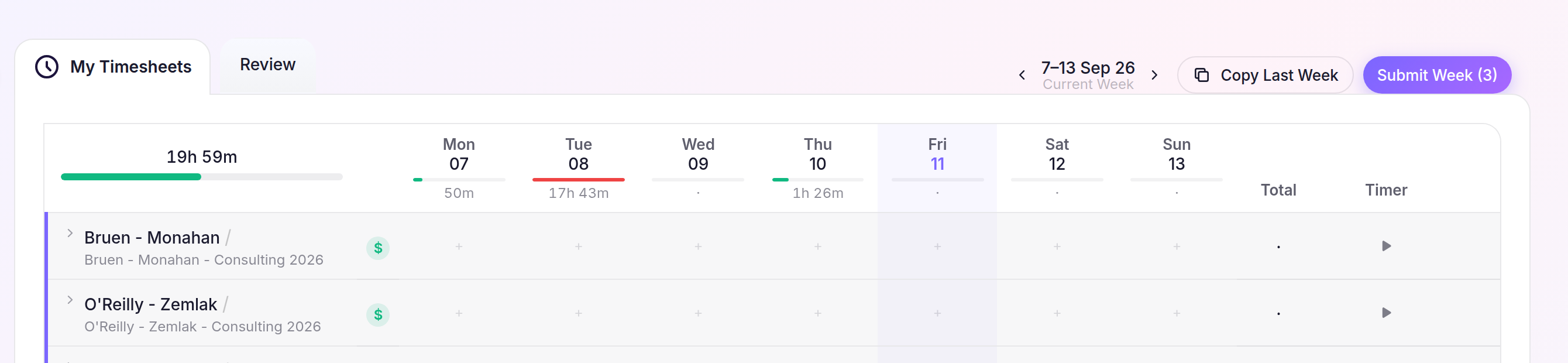
You can also add or edit Draft entries manually before submitting.
Submit for review
- Select Submit Week.
- If the prompt lists active timers, add any notes you need; Cheku will stop and save those timers, then you can select Submit Week.
- If there are no active timers, select Submit in the Submit week for review? prompt.
The week’s entries become Submitted and stay locked while they wait for approval.